
In brief: Our 2026 backup camera test and comparison reveals clear differences between systems. Wireless models are easier to install, while wired systems often provide a more stable connection. Resolution is key to a clear picture, as is compatibility with your vehicle. We compare the best options to help you choose the right camera.
Looking for a reliable backup camera to make driving and parking safer and easier? Our 2026 test and comparison can help. We take a close look at the latest systems and explain which technology suits different needs. Whether you want a simple entry-level model or a feature-packed premium system, you’ll find the right recommendation here.
A good backup camera reduces blind spots and helps prevent accidents while you’re maneuvering. With so many models available, it helps to focus on the key buying factors: image quality, installation and useful features. This guide will help you choose the right system for your vehicle.
Contents
What makes a good backup camera?
Before choosing a model, it helps to understand the basics. Not every system is right for every vehicle or situation.
Choosing the right resolution
Image clarity matters. A blurry picture won’t help much, so check the stated resolution. HD Ready (720p) is a good baseline. Full HD (1080p) shows even more detail, making it easier to spot things like curbs and small toys.
Megapixels aren’t everything. Image processing matters, too. A camera with a good sensor and smart software can produce a clearer picture with fewer megapixels than a low-cost model with a higher pixel count.
Viewing angle and night vision
The viewing angle determines how much of the area behind you appears on screen. An angle that’s too wide can distort the picture, while one that’s too narrow leaves too much out of view. A range of 120 to 150 degrees is a good compromise. Night vision is essential if you’ll use the camera in the dark. Infrared LEDs light up the scene without visible light.
Wireless or wired: which type is right for you?
The main difference between systems is how they transmit the video signal. Each type has its pros and cons.
Benefits of wireless backup cameras
Wireless systems, such as the , transmit video without a cable. Their main advantage is easy installation: there’s no need to run a cable from the rear of the vehicle to the dashboard. That saves time and makes wireless systems a good choice if you don’t want a permanent installation. Many cameras attach quickly with a magnetic or adhesive mount.
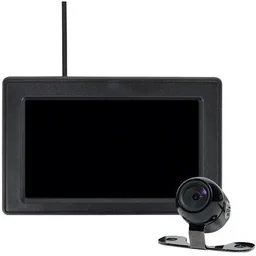
Wireless signals can be affected by interference. In areas with lots of wireless networks, such as cities, the video signal may cut out. Check that the connection is stable before finishing the installation.
Benefits of wired backup cameras
Wired systems provide a reliable connection with virtually no lag. The picture appears without delay, making them a good choice for a permanent installation. Running the cable takes more time, but the result is a clean, integrated setup. Many backup cameras in this category are especially durable.
Features to look for
Modern backup cameras do more than show a live video feed. Extra features can make parking safer and easier.
Dynamic and static parking guidelines
Most cameras display parking guidelines on screen. Static lines mark a fixed area. Dynamic guidelines, often found on higher-end models, move as you turn the steering wheel. They show the path your vehicle is likely to take at the current steering angle, making it much easier to park in tight spaces.
Built-in sensors and multi-camera systems
Some systems pair a camera with ultrasonic sensors. You get a video feed as well as audible alerts when you approach an obstacle. Multi-camera systems let you connect several cameras, so you can add another at the front of your vehicle or on a trailer.
If you tow a trailer often, consider a multi-camera system. You can connect a camera on the trailer for a clear view behind you, without needing someone to guide you.
Backup camera installation: what you need to know
Proper installation helps your camera work reliably and last longer. Plan the setup carefully.
Where to mount the camera
For the best view, mount the camera as high and as close to the center of the rear of your vehicle as possible. Common locations include above the license plate, in the tailgate handle or in the bumper. Make sure the license plate frame doesn’t block the lens and that the camera is protected from splashing water.
Power supply and wiring
The camera needs a power source, usually the backup lights. When you shift into reverse, the camera powers on automatically and sends the picture to the monitor. When routing cables, keep them away from sharp edges. Use cable ties and run them alongside existing wiring harnesses.
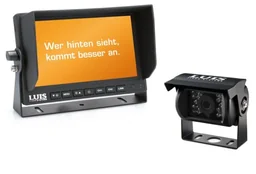
You can choose from several monitor options. Mount a separate screen on the dashboard or use a car stereo with a camera input. Some systems, such as the , are designed to work with 7" radio systems.
Backup cameras compared: 2026
This table gives you a quick overview of selected models and their key features, so you can compare them side by side.
Our most-reviewed backup cameras, compared side by side:
| Model | Customer rating | Availability |
|---|---|---|
| 276336 Stripe Cam 112 | – | Currently unavailable |
| 7" Basic Camera System - black | – | Currently unavailable |
| Dashboard 412GW | – | Currently unavailable |
| Wi-Fi Backup Camera System | – | Currently unavailable |
| Wireless Backup Camera and Monitor | – | Currently unavailable |
How to Maintain Your Backup Camera
To keep your camera delivering a clear image over the long term, it needs very little maintenance. Just like your windshield, the lens can get dirty.
Clean the Lens Regularly
Clean the camera lens regularly with a soft, lint-free cloth. A microfiber cloth made for eyeglasses works particularly well. For stubborn dirt, apply a small amount of glass cleaner to the cloth only; never spray it directly onto the lens. A clean lens is especially important in winter and rainy weather.
Check the Mount and Connections
Check regularly that the camera is still securely mounted. Vibrations can loosen the mount. For wireless systems, replace the batteries in the camera unit before they run low. For wired systems, check the plug connections for signs of corrosion.
Conclusion: How to Choose the Right Backup Camera
The right backup camera depends largely on your needs and your vehicle. For a simple, temporary solution, wireless systems such as the are an excellent choice. You can install them in minutes and improve your safety right away.
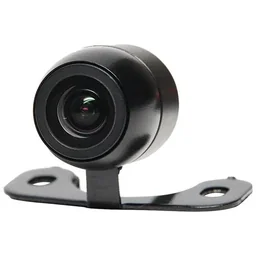
If you want maximum reliability and a permanent installation, a wired system is the way to go. The time or installation cost is well worth it. Look for good resolution and useful features such as dynamic parking guidelines.
Whichever system you choose, a backup camera is one of the most useful upgrades for improving vehicle safety. It protects your car and, above all, other road users, while helping you avoid stress and potentially costly repairs in the long run. Use our comparison criteria to make your choice and enjoy easier maneuvering.
Frequently Asked Questions
- Will a backup camera work with any car?
- In most cases, yes. Systems are available for almost every type of vehicle, from compact cars to vans. The main choice is between universal aftermarket systems and vehicle-specific models. Universal cameras can often be mounted more flexibly, while vehicle-specific models integrate neatly into the existing tailgate or handle.
- Which is better: a wireless or wired backup camera?
- Wireless cameras are much easier to install because you do not have to run cables through the vehicle. They are ideal if you do not need a permanent installation. Wired systems provide a more reliable, uninterrupted signal, but take more work to install.
- What resolution should a good backup camera have?
- For a clear, detailed image, look for at least 720p (HD) resolution. Full HD (1080p) systems are even better, with sharp outlines that make it easier to spot small obstacles and curbs. In low light, however, resolution alone is not the deciding factor.
- Can I install a backup camera myself?
- With some practical skills and detailed instructions, you can often install a wireless backup camera yourself. Wired systems are more challenging because you need to run cables through the interior. If you are unsure, we recommend having a professional auto shop install it.
- Which backup camera features are useful?
- Useful features include dynamic parking guidelines that move with the steering angle and night vision for better visibility in the dark. A waterproof housing is essential for permanent outdoor use. Integrated sensors with audible alerts provide an extra layer of safety.
You may also be interested in
- Dash Cam Test & Comparison 2026
- Car Multimedia Test & Comparison 2026: The Best Systems for Your Vehicle
- Security System Test & Comparison 2026
- Bike Rack Test & Comparison 2026
- Monitor Test & Comparison 2026: The Best Models Reviewed
- Car Diagnostic Tool Test & Comparison 2026: The Best Devices in Practical Testing