
In brief: If your cordless trimmer is cutting poorly, the blade is usually blunt, worn or damaged. An uneven cut with frayed grass blades is a clear sign. Check the blade for cracks and notches and replace it with a suitable spare part if necessary.
A neatly trimmed lawn edge is the finishing touch to any garden maintenance. But the pleasure quickly disappears when your cordless trimmer only pulls and tears at the grass instead of cutting it cleanly. Cutting performance drops, the work becomes tiring and the result looks untidy. In most cases, the cause is simple and quick to fix: a worn blade.
Before starting an extensive fault-finding process, check the cutting tool. A fresh, sharp blade often fully restores your tool’s original performance. For owners of the popular Westfalia cordless trimmer, the solution is straightforward. The precisely fitting : Curved replacement blade for cordless trimmer Art. 984031 makes an immediately noticeable difference and turns lawn edging into a pleasure again.
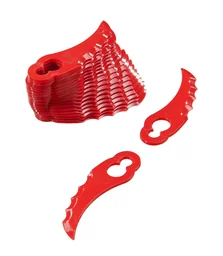
How can I tell if my trimmer blade is blunt or damaged?
You do not need to be an expert to identify a worn blade. A few careful checks of the blade and the lawn’s cut will reveal everything you need to know. Look out for clear signs so you can act in good time and prevent consequential damage to the tool or lawn.
Visual inspection: cracks, notches and wear
Inspect the blade closely. With plastic blades, you will often see frayed or rounded cutting edges. Small stones, wall edges or wooden fences can quickly leave notches and cracks. Even the smallest damage can create an imbalance that causes vibrations. If a piece of the blade is missing, immediate replacement is essential.
The cut as an indicator
A healthy, sharp blade cuts the grass blade cleanly. The cut edge is smooth. A blunt blade, on the other hand, knocks the grass blade off and shreds it. The result is yellowish, unhealthy-looking tips. This frayed cut is more than just a visual defect. It creates a large surface area for fungal diseases and dries out the lawn. A precise cut is therefore an important part of overall Garden + Outdoor care.
A clean cut seals the grass blade and promotes healthy growth. A frayed cut caused by a blunt blade puts unnecessary stress on the plant and makes it more vulnerable.
Unusual noises and vibrations
Listen carefully when you start your trimmer. A damaged or incorrectly fitted blade often produces a loud rattling noise. Strong vibrations that you can feel in the handle are also a clear warning sign. This imbalance puts strain not only on your arms but also on the tool’s bearing and motor. Do not ignore these signs if you want to avoid an expensive repair.
How do I replace the blade on my cordless grass trimmer correctly?
Replacing the blade is straightforward on most cordless trimmers and can be done in just a few minutes. Even so, mistakes happen regularly that can affect operation or even be dangerous. Careful handling is essential for a perfect result and your safety.
Safety first: preparing to replace the blade
Start with the most important step: always remove the battery before working on the cutting head. This prevents the motor from starting accidentally. Wear sturdy work gloves to protect yourself from the sharp edges of the new blade. Remove grass and dirt from the trimmer head so you have a clear view of the fastener.
Important note
Never work on the cutting tool while the battery is connected to the device. An accidental start can cause serious injury. Safety must always come first.
The replacement itself: instructions for common systems
Most plastic blades are secured with a central screw or a click-fit system. Loosen the screw using the appropriate tool. You often need to block the blade carrier to prevent it from turning as well. Remove the old blade and fit the new, suitable replacement blade. Make sure it is aligned correctly – many blades have a specified direction of rotation. Then tighten the screw by hand.
Avoid common mistakes when replacing the blade
A common mistake is fitting the blade in the wrong position or even upside down. The cutting edges must point in the direction of rotation. Another mistake is using unsuitable replacement parts. Each tool is designed for a specific blade. Use only original or explicitly compatible replacement parts such as the : replacement blade for the Westfalia trimmer to guarantee the correct fit and safety. Tightening the retaining screw too firmly or leaving it too loose can also cause problems.
Pro tip
Take a photo of the old blade’s position with your smartphone before removing it. This gives you a reference and ensures that you fit the new blade in exactly the same way.
What are other causes of poor cutting performance?
You've fitted a new blade, but your cordless trimmer still isn't cutting properly? The cause may lie elsewhere. The power supply, mechanical blockages or incorrect operating technique can also significantly affect performance.
The battery: Is the power supply the problem?
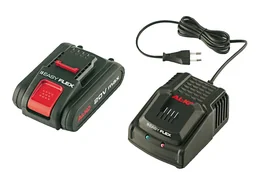
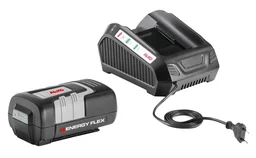
A cordless trimmer needs full power to keep the blade spinning at high speed. As the battery loses charge, the blade spins too slowly and can no longer cut the grass cleanly. This is particularly noticeable with dense or damp grass. If your battery is already several years old or is becoming difficult to charge, it's time for a replacement. A fresh battery can often work wonders. With a value bundle such as the : "EasyFlex" value bundle or the more powerful : "EnergyFlex" value bundle, you'll be ready for long jobs.
The motor and drive: Blockages and overheating
Long grass and damp debris can wrap around the drive shaft and block the blade carrier. This blockage slows the motor down and drastically reduces the speed. Remove the battery and inspect this area. Turn the blade by hand to check whether it moves freely. Carefully remove any foreign objects. The motor can also temporarily lose power if it overheats during intensive use. Give the device a break.
Regular cleaning isn't a chore; it's the best insurance for a long service life and consistent performance from your cordless garden tools.
The wrong technique: How to use your trimmer correctly
Sometimes the problem isn't with the device but with how it's used. Don't force the trimmer through tall, dense grass. Instead, work your way down in layers from the top. Guide the device in a steady, sweeping motion and let the tip of the blade do the work. This gives you the cleanest cut while also protecting the motor and battery.
Care and maintenance: How to keep your cordless trimmer sharp for longer
With a few simple, regular steps, you can ensure that your cordless trimmer is always ready for use and delivers full power. Good care significantly extends the service life of all components and saves you money and hassle in the long run.
Clean the trimmer after every use
Make a habit of giving your trimmer a quick clean after every use. Use a brush to remove grass clippings and soil from the cutting head, guard and ventilation slots in the motor housing. You can wipe away stubborn dirt with a damp cloth. A clean device makes inspection easier and prevents dirt from building up and blocking the mechanism. You can find suitable cleaning tools in our Scrapers + Knives category.
Store the trimmer and blades correctly
Store your cordless trimmer in a dry, clean place, ideally hanging on a wall. Keep the batteries separately at room temperature. Avoid storing them in direct sunlight or freezing temperatures. It's best to keep replacement blades in their original packaging to protect them from damage and corrosion until they're needed.
Additional advice
Over winter, it's best to store lithium-ion batteries at a charge level of around 50-70 %. This protects the battery cells and ensures maximum service life. Avoid storing them either fully charged or completely discharged.
When is a repair no longer worthwhile?
A faulty switch, damaged housing or worn blade can usually be repaired easily. However, if the motor makes strange noises, smells burnt or has lost all its power, a repair may no longer be cost-effective. In such cases, investing in a new, modern device is often the more sensible choice. You'll find a wide range of powerful garden tools in the Westfalia Shop.
A cordless trimmer that cuts poorly is usually no cause for concern. In most cases, the problem is a blunt or damaged blade. With the right replacement part and a few simple maintenance steps, you can quickly restore your device to full power and enjoy perfect results in your garden.
Frequently asked questions
- How often do I need to change the blade on my cordless trimmer?
- That depends on how often you use it and the type of grass you cut. Check the blade before every use. Replace it as soon as you notice frayed grass blades or reduced cutting performance. Plastic blades may need replacing several times per season.
- My grass trimmer vibrates heavily. Could the blade be the cause?
- Yes, strong vibrations are often a sign of a damaged or unbalanced blade. A small notch or broken-off piece can disrupt rotation. Replace the blade immediately to prevent damage to the tool and ensure safe operation.
- Can I use any blade with my cordless trimmer?
- No, only use replacement blades approved by the manufacturer for your specific model. The wrong blades can affect performance, pose a safety risk and damage the trimmer.
- My trimmer keeps switching off even though the battery is fully charged. What could be causing this?
- This may indicate that the motor is overloaded. The trimmer head is often blocked by grass and dirt. Switch off the tool, remove the battery and clean the area around the blade holder thoroughly. Check that the blade can turn freely.
- My Westfalia 984031 trimmer is no longer cutting properly. Which blade do I need?
- For the Westfalia cordless trimmer 984031, you need the specially shaped replacement blades with product number 984032. They are perfectly matched to the tool and restore full cutting performance. You can find them directly in the Westfalia shop.
You may also be interested in
- Is your cordless trimmer ready for spring? The blade check is key
- Clean garden edges: trimming tips with the right blades
- Curved trimmer blade: the secret advantage for your lawn
- Cordless grass and shrub shears: how to maintain your tool for a long service life
- Cordless garden tool losing power? 5 common problems and solutions
- Chainsaw cutting poorly? Problems and solutions