
In brief: Security cameras improve the safety of your home by deterring intruders and documenting incidents. You receive real-time movement alerts, monitor your property remotely via an app and gain a clear picture of what is happening around your home. Integration with smart home systems makes them a central component of a modern security strategy.
Home Security Cameras: Keeping Your Home Safe
A safe home is the foundation of peace and relaxation. Modern security cameras protect your property, give you peace of mind and integrate seamlessly into your everyday life. They are more than just a tech gadget.
They are an active part of your personal security strategy. This article explains what to consider when choosing and using cameras for your home and garden.
Why is a security camera worth having for your home?
The mere presence of a clearly visible camera deters potential intruders. It documents incidents in full and provides important evidence if something happens. Above all, this gives you control and information.
You receive notifications on your smartphone when something happens outside your front door or in the garden. Whether it is a parcel delivery, a visitor or unwanted movement, you stay informed. This provides peace of mind even when you are not at home.
Expert tip
Place your first camera in a clearly visible position at the main entrance. This is where its deterrent effect is greatest. Combine it with a smart outdoor light from our garden equipment range – light and camera make a powerful team.
How do you choose the right camera system?
Start by considering how you intend to use it. Do you only want to monitor the entrance to your home, or do you want to cover an entire Garden + Outdoor area? Do you need sharp detail, such as faces, or just a general overview?
Outdoor or indoor camera?
Outdoor cameras must be weatherproof. Check the IP rating. IP65 or IP66 is standard for outdoor use. These cameras withstand rain, snow and dust. Indoor cameras are often more compact and quieter, but do not need to cope with extreme temperatures.
For outdoor use, special housings and robust mounts are essential. You can also browse our Workwear & Safety category for suitable mounting equipment.
Resolution and image quality
Full HD (1080p) is the minimum today. 2K or 4K resolution delivers even sharper images, but requires more storage space and bandwidth. Image processing is often more important than the number of pixels alone. Good night vision and a wide viewing angle are more practical than the highest possible megapixel count.
The best camera is the one you actually install. A complex system with lots of cables often fails during installation. A simple wireless starter kit provides more security than a perfect plan that stays in a drawer.
Which features are really important?
Not every feature is equally relevant to every household. Focus on the functions that genuinely improve your everyday life.
Motion detection and notifications
Intelligent motion detection filters out false alarms caused by passing clouds or small animals. You receive only relevant push notifications on your phone. Some systems can even distinguish between people, animals and vehicles.
Two-way audio
A built-in microphone and speaker allow you to communicate with people outside. You can give the delivery driver instructions or clearly address unwanted visitors directly. This greatly strengthens the deterrent effect.
Important note
Respect other people's privacy! Position your cameras so that they capture only your private property. Continuously filming public pavements or neighbouring properties can raise data protection issues and may have legal consequences.
Night vision and lighting
Infrared (IR) night vision is standard. It illuminates the scene invisibly to the human eye. The range varies between models. Some cameras combine night vision with an integrated LED floodlight that switches on when movement is detected and provides colour images at night.
For good illumination of your property, you can also use separate lighting from our garden equipment range. A reliable torch such as the
is also a practical tool for checking your property at night.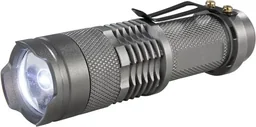
How do you install your cameras correctly?
Positioning determines how useful your cameras are. Plan carefully before buying and installing them.
The ideal location
Mount cameras at a height of 2.5 to 3 metres. This is high enough to prevent easy access but low enough to capture useful images. The viewing angle should cover strategic points such as doors, gates, garage entrances and windowless walls.
Avoid direct sources of backlighting, such as the setting sun. They can result in overexposed images. Watch out for nearby branches or plants that could constantly trigger motion detection in windy conditions.
Cabling is the Achilles' heel of many installations. If you are building or renovating, take the opportunity to install conduit. This makes it easy to upgrade the system or replace cables later without having to reopen the façade.
Power supply and network
Wireless cameras run on a battery or solar panel. They are flexible, but require regular maintenance. Wired cameras with Power-over-Ethernet (PoE) are the most reliable solution. A single cable carries both power and data. You will need a compatible network switch or recorder.
Additional advice
Test everything before final installation! Temporarily attach the camera with tape or a clamp to a broom handle. Then walk through the planned viewing angles and check the image quality and app notifications over a full day-night cycle.
Wireless or wired? Choosing the right system
The choice between wireless and wired systems affects reliability, maintenance requirements and investment.
Advantages of a wireless system
Installation is quick and easy. You avoid laying long cables. Cameras can be repositioned easily when needed. Modern Wi-Fi cameras transmit encrypted footage in good quality. They are the ideal solution for rented homes or getting started quickly.
An example of a complete wireless system is the
. It offers four channels and two weatherproof outdoor cameras for comprehensive protection.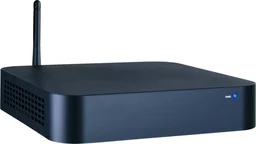
Advantages of a wired system
PoE systems are extremely stable. They are not affected by fluctuations in Wi-Fi. The power supply is permanent, so you do not need to replace batteries. They are perfect for continuous monitoring of large properties or commercial premises. Initial installation is more involved, but long-term operation is worry-free.
Smart home integration and data security
A standalone security camera is useful. A camera that communicates with other devices is even better.
Connecting your smart home
Many cameras work with Alexa, Google Assistant or Apple HomeKit. You can view the live feed on your TV or smart display. Set up automations: when your smart garden lights turn on, the camera starts recording. When you leave home, all your cameras are armed.
Keeping your data secure
Change the default passwords for your camera and router right away. If possible, enable two-factor authentication for your camera account. Decide whether local storage (SD card, NVR) or cloud storage is right for you. Locally stored data stays in your hands. Cloud services are convenient, but your recordings are stored on external servers.
Also remember to protect your home from unwanted animal visitors. An
helps keep annoying insects away so they don't swarm around the camera lens at night and trigger false alarms.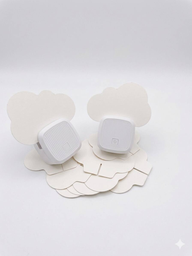
Conclusion: greater security with smart technology
Security cameras are a valuable way to help keep your home safe. Start by clearly defining what you need. Then choose a system that matches your technical know-how and security needs.
A well-positioned camera at the entrance, paired with another covering the garden, provides a solid foundation. Integrate them into your smart home and handle your data responsibly. This gives you a modern, effective security network for your home.
For all your other home and property projects, you'll find a wide range of materials and tools in our shop.
Frequently asked questions
- Do I need permission to install a security camera?
- You can record your own property. Your camera must not be permanently aimed at public sidewalks, roads or neighboring properties. Follow data protection rules, and let your neighbors know if their property might appear at the edge of the footage. In general, monitoring only your own property is permitted.
- Are wired or wireless security cameras better?
- Wired cameras (PoE) provide a stable power and data connection, are ideal for continuous use and don't require Wi-Fi. Wireless cameras are easier to install in more locations, but rely on Wi-Fi range and battery life. For fixed outdoor locations, wired systems are often more reliable.
- Can I use security cameras at night?
- Yes, most outdoor cameras have night vision. Infrared (IR) night vision records in black and white in complete darkness, often at distances of up to 30 metres. Some models offer color night vision with special sensors or ambient light. Check the stated IR range.
- Where should I store my security camera footage?
- You can store footage locally on an SD card in the camera, on a Network Video Recorder (NVR) or in the cloud. Local storage gives you full control over your data. Cloud storage lets you access footage from anywhere, but often involves monthly fees and requires an internet connection.
- Can security cameras work with my smart home?
- Many modern cameras support protocols such as ONVIF or work with platforms such as Google Home, Amazon Alexa or Apple HomeKit. You can include cameras in automations—for example, have a camera start recording when the garden lights turn on. Check compatibility before buying.
You might also be interested in
- Home monitoring with IP cameras: keep an eye on your home
- Security camera review and comparison 2026
- Smart home security: how to use security cameras correctly
- Security fittings: effective protection for your home
- Home security against break-ins: tips and DIY measures
- Fire safety at home: your guide to maximum security