
In brief: A good power strip in 2026 stands out with robust surge protection, sufficient spacing between the sockets and a high total load capacity. Important features include individual switches, USB ports and a sturdy design. The right choice depends on your specific application, whether in a home office, household or workshop.
Power Strip Test & Comparison 2026: Safety and Functionality Reviewed
Finding the right power strip involves more than simply choosing the number of sockets. In 2026, safety, smart features and durable construction are the top priorities. Our test and comparison helps you make the best choice for your home, office or workshop.
Table of contents
- Which criteria are important in the test?
- Power strips compared directly
- What types of power strips are available?
- What is the focus when it comes to safety and protection?
- Which features offer practical benefits?
- How do installation and locations differ?
- Buying guide: How to find your perfect power strip
Which criteria are important in the test?
In our test, we focus on measurable properties that matter in everyday use. Build quality comes first. A robust housing made from sturdy plastic or, as with our
, aluminium, withstands impacts and retains its shape for years.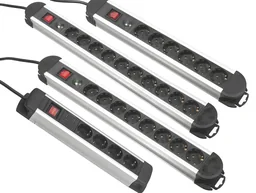
The spacing between the sockets is an often underestimated criterion. Narrow spacing means that larger plug-in power supplies block adjacent sockets. Good power strips offer alternating socket positions or generous spacing.
The maximum total load, specified in amperes or watts, is an essential safety criterion. It defines the upper limit for all connected devices combined. We test whether the manufacturer's specifications are realistic and whether the power strip remains stable under a high load.
Other test points include the ease of use of the switches, the quality of the cable and plug, and the effectiveness of protective features such as child protection and contact protection.
Power strips compared directly
In 2026, there is a wide range of models available. The following table compares selected, typical examples from different categories. This lets you see at a glance which power strip offers which strengths.
The highest-rated power strips in our range compared directly:
| Model | Customer rating | Availability |
|---|---|---|
| 10-way aluminium power strip with surge protection and switch | – | Currently unavailable |
| 2-gang "Core" socket - with hinged cover and residual-current circuit breaker | – | Currently unavailable |
| 2-gang "Core" socket - with hinged cover and residual-current circuit breaker | – | Currently unavailable |
| 2-way earthed socket with 1m connection cable and bare ends for permanent installation | – | Currently unavailable |
| 3-way power strip with individual switches | – | Currently unavailable |
What types of power strips are available?
Not every power strip is designed for every purpose. Understanding the basic differences helps narrow down your choice.
Basic extension leads
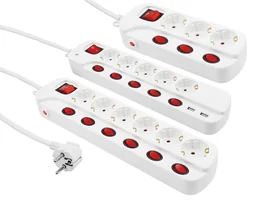
These models provide several sockets in a row, often with a shared power switch. They are the classic solution for temporary use, such as at a desk or beside the sofa. One example is the with its practical individual switch for each socket. You will find a wide selection in the power strips section.
Power strips with surge protection
This category is essential for providing long-term protection for sensitive electronics. These power strips contain protective electronics that divert dangerous voltage spikes. Our with aluminium housing is an example of this safety-focused class.
Power strips with USB ports
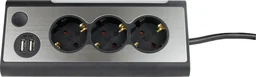
These combine power sockets and a charger. Models such as the often integrate two or more USB-A or even USB-C ports. This saves space and is convenient. Charging power varies considerably, so it is worth checking the technical specifications.
Tip: When choosing a USB power strip, check the total charging output. It should be high enough to charge several devices quickly at the same time. Power shared between multiple ports can slow down the charging process.
Fixed or surface-mounted power strips
These variants are designed for permanent installation on the wall or beneath a desk. They are screwed in place and provide a very secure hold. They are ideal for workbenches, home office workstations or media centres. You can find more information about planning under electrical installation.
What should you look for in terms of safety and protection?
The safety of your devices and home depends largely on the quality of the power strip. In addition to the load capacity mentioned above, other protective features are critical.
Surge protection is the most important active protection. It is measured in joules (J). A higher joule rating means a greater capacity to absorb voltage spikes and often a longer service life for the protective component.
A thermal overload protection feature helps prevent fires if the maximum load is exceeded. Ideally, it interrupts the circuit before the housing becomes dangerously hot.
Mechanical protection is just as important. Child safety shutters or lockable protective covers prevent children from inserting objects into the sockets. A robust cable outlet (strain relief) prevents the cable from breaking at the connection.
Warning: Never continue using a damaged power strip. Cracks in the housing, loose sockets, a burnt smell or discoloured plastic are clear warning signs. Replace the power strip immediately.
Which features offer practical benefits?
Modern power strips offer more than just electricity. These features make everyday use more convenient.
Individual switches for each socket, as found on the , are a major advantage. They disconnect devices completely from the power supply without having to unplug them. This saves standby power and improves safety.
An illuminated switch or status LEDs show at a glance whether the power strip is switched on or whether surge protection is still active. This is particularly useful in the dark area under a desk.
A coiled or extra-long cable provides flexibility when positioning the power strip. Make sure the cable is long enough to avoid creating a trip hazard.

Swivelling or rotating sockets make it easier to accommodate large plug-in power supplies while saving space. They are an intelligent solution for tight spaces behind furniture.
Note: The number of earthed sockets (Schuko) is not the only figure that matters. Add the USB ports to determine the power strip's actual total connection capacity.
How do installation and usage locations differ?
The intended location determines the ideal design and installation method.
For desks and home offices
Compact power strips with individual switches and USB ports are ideal here. They should be easy to access and take up as little space as possible. A permanently mounted under-desk power strip keeps things tidy and hides the cables.
For workshops and garages
Durability is the priority. The housing should be impact-resistant and the cable particularly robust. Wall mounting keeps the power strip securely in place and protects it from falling tools. Also take a look at our Technology category for more accessories.
For living rooms and entertainment areas
Behind a TV cabinet or stereo system, slim, long power strips are in demand. Surge protection is essential here for televisions, receivers and games consoles. A shared master switch lets you disconnect all devices from the mains with a single click.
Buying guide: How to find the perfect power strip
Follow these steps to find the ideal power strip for your needs.
1. Analyse your requirements: Count all the devices you want to connect permanently or temporarily. Plan for at least two spare sockets. Take your devices' power consumption (in watts) into account.
2. Determine your safety requirements: Are you connecting sensitive or expensive electronics? Then a power strip with surge protection and a high joule rating is essential. Reliable child safety shutters are essential for children's bedrooms or households with children.
3. Choose the right features: Do you need USB charging options? Are individual switches important to you? Should the power strip be permanently mounted or portable? The answers to these questions will narrow down your selection.
4. Check the quality features: Read test reports and customer reviews. Look for recognised safety certifications (GS, VDE). The workmanship should be high quality and the cable firmly connected to the housing.
5. Make your final choice: Compare the models on your shortlist using our table and your priorities. Invest in quality and safety – a good power strip will serve you reliably for many years.
With this knowledge from our 2026 test and comparison, you are well equipped to find the power strip that perfectly matches your requirements. Always remember: with electrical products, the safer choice is usually the better choice.
Frequently Asked Questions
- Why is surge protection important for power strips?
- Surge protection safeguards expensive electrical devices such as computers, televisions and games consoles from voltage spikes caused by lightning strikes or fluctuations in the mains supply. A power strip without this protection only provides multiple sockets, not safety for the connected devices.
- How many sockets do I need on a power strip?
- Plan for spare capacity. Count the devices you currently need to connect and add two or three sockets for future purchases or guests. Make sure the plugs do not take up the space next to one another. Six to eight sockets are often ideal for home use.
- What does the 'max. load' rating in amps or watts mean?
- This rating defines the maximum power that all connected devices may draw together. If you exceed this value, the power strip can overheat and create a fire risk. Add up the wattage of your devices and stay well below the power strip's limit.
- Are power strips with USB ports useful?
- Yes, they are practical for charging smartphones, tablets or Bluetooth headphones directly without occupying a socket with a separate charger. Check the USB charging output (in watts or amps) to ensure your devices charge quickly enough. Integrated USB ports also leave the sockets free for other devices.
- Can I plug power strips into one another (daisy-chaining)?
- No, connecting multiple power strips in this way is dangerous and significantly increases the risk of fire. The cables can easily become overloaded, and the safety standards apply only to the individual power strip. Instead, use a power strip with enough sockets.