
In brief: Smart home alarm systems protect doors, windows and interiors with sensors, sirens and app notifications. For effective home security, combine mechanical burglary protection with a properly planned alarm system. When installing an alarm system, check wireless range, power supply, data protection and how all household members respond before arming it.
Smart home alarm systems combine traditional security technology with digital control. Sensors detect open windows, movement or unusual activity. The control unit triggers a siren and, if required, sends a notification to your smartphone.
How does a smart home alarm system protect your home?
An alarm system monitors defined areas and responds as soon as a sensor detects a specified change. A magnetic contact registers when a door or window is opened. A motion detector senses movement caused by heat in a room. The control unit evaluates the signal and activates the selected response.
Effective home security relies on combining several layers of protection. Locked doors, sturdy window fittings and good outdoor lighting make access more difficult. The alarm system also shortens response times by reporting an incident immediately.
Smart living does not mean connecting every device indiscriminately. You decide which sensors work together, when an alert appears and who can access the app. A clear structure makes the system reliable in everyday use.
What components make up an alarm system?
- Door and window contacts: These usually consist of two parts and report when the distance between them changes. Install them at main entrances and on easily accessible ground-floor windows.
- Motion detectors: They monitor rooms and hallways. Position them so they cover routes to important areas, but are not affected by heaters, direct sunlight or moving curtains.
- Control unit: It receives sensor signals and controls the siren, app and other components. A battery can keep the system working during a short power cut.
- Indoor and outdoor sirens: The indoor siren deters people inside the house. An outdoor siren makes the alarm visible to neighbours, but may only be installed in accordance with applicable regulations and the manufacturer's instructions.
- App and user accounts: They display events, allow you to arm and disarm the system and manage access rights. Create a separate account for every authorised person.
Pro tip
Start with the most important entrances and expand the system later. A small, properly configured area provides more protection than many sensors with unclear responsibilities. Give each zone a clear name, such as “Ground-floor patio door” instead of “Sensor 4”.
A good system distinguishes between home and away modes. In everyday use, you can monitor only the perimeter and move freely around the house. When you leave the building, activate the motion detectors as well. These partial protection zones help prevent false alarms and adapt to your daily routine.
“The longer a burglar takes, the more likely they are to give up.”
How do you plan sensors and alarm zones?
Start by planning the system around the building envelope. Mark doors, windows, basement window wells and other access points on a floor plan. Then mark the rooms where movement should be detected.
Which areas need priority?
- Main entrance: A door contact detects opening. A keypad or PIN code allows you to disarm the system when entering.
- Patio and balcony doors: These entrances are often at the rear of the property and deserve particular attention. Add a glass-break detector if the construction and alarm system are suitable for one.
- Ground-floor windows: Secure easily accessible windows with contacts. In large rooms, a motion detector can provide an additional layer of protection.
- Basement and garage: Check wireless range, temperature and humidity in these areas. Many wireless components only work reliably within specific temperature ranges.
- Hallways and stairs: Motion detectors in these locations detect movement through the house. Position them so that pets are unlikely to enter the detection area.
When do motion detectors work reliably?
A motion detector works most reliably when people move across its field of view. If someone walks directly towards the detector, detection may be triggered less early, depending on the technology. Therefore, follow the recommended installation height and detection angle.
Pets affect the planning process. Some detectors distinguish animals up to a specific weight, while others do not. Do not rely solely on the term “pet-friendly”; check the technical specifications and test the sensor under real-life conditions.
Outdoor areas can also be monitored, but require weatherproof components and careful positioning. Rain, moving plants, passing cars and changing light conditions can trigger false alarms. For patios, garden paths and outbuildings, you can find complementary solutions in the Garden + Outdoor section.
Important note
A burglar alarm does not replace smoke alarms, carbon monoxide detectors or other mandatory safety equipment. Use suitable, approved devices for fire and hazardous situations. Also check local regulations before installing an outdoor siren or connecting a monitoring service.
Define a clear response for each zone. When you are at home, a window contact may trigger only a silent app notification. When you are away, the same zone can activate the siren. You configure these rules in the control unit or app.
What do you need to consider regarding data protection and connected technology?
Depending on their features, smart home components process motion data, timestamps, location information and contact details. Before buying, check whether the system operates locally, requires the cloud or offers both options. The less data is transmitted permanently, the smaller the attack surface remains.
Cloud, app or local control?
| Control | Advantage | What to look out for |
|---|---|---|
| Local control unit | Some functions remain available even without an internet connection. | Check the battery, data backup and operation in the event of a router failure. |
| Cloud connection | You receive notifications while away and can control the system remotely. | Check data protection, server location, update support and ongoing costs. |
| App control | You can view events quickly and manage user permissions. | Protect your smartphone, app and account with separate login details and two-factor authentication. |
Which settings secure your smart home?
- Change preset passwords as soon as you set up the system. Use different, long passwords for the control unit, app and router.
- Activate two-factor authentication if the provider supports it. An additional verification factor makes it harder to access your account.
- Install firmware and app updates promptly. Updates close known security vulnerabilities and often improve stability.
- If possible, connect smart home devices to a separate Wi-Fi network. This keeps access to computers, private files and printers separate.
- Disable features you do not need. These include unused remote access, open user accounts and unnecessary voice control.
- Remove former users immediately. Check permissions after moving house, changing carers or making changes to your household.
Data protection starts with your choice of system. Read the information about data storage and delete event logs you no longer need. Cameras require particular consideration for neighbours, visitors and delivery drivers. Only set up recordings where they are legally permitted and genuinely necessary for protection.
“Secure passwords and regular updates are essential equipment for a connected home.”
How do you install an alarm system correctly?
Read the instructions in full before installation. Check battery types, mounting distances, wireless range and the order of setup. When installing an alarm system, you should first configure the control unit close to the router and the most important sensors.
How do you install contacts and detectors?
- Clean the mounting surfaces and allow them to dry completely. Dust and grease reduce the adhesion of adhesive pads.
- Mount the two parts of a magnetic contact so that they are correctly aligned opposite each other when the door or window is closed.
- Screw on security-critical components if the surface and the instructions allow it. Adhesive mounting is not suitable for every surface.
- Align motion detectors with the detection area. Avoid pointing them directly at radiators, windows and moving objects.
- Do not place the control unit in a shielded cabinet or directly next to large metal surfaces. These can interfere with the wireless connection.
How do you test the alarm chain?
- Name each zone and open the door and window contacts one at a time.
- Trigger the motion detectors from different directions and check whether the control unit displays the correct room.
- Test the siren, app notification and, if applicable, the emergency call separately.
- Check the entry and exit delay. You must be able to operate the system safely without triggering a false alarm.
- Repeat the test with the router or internet connection switched off, provided the system supports local operation.
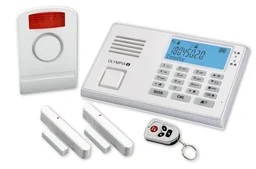
The Protect 9045 alarm system set with emergency call and hands-free function may be of interest to households that need a direct voice connection in addition to alarm activation. Before making a decision, check the supported sensors, connection types, emergency call conditions and the desired range.
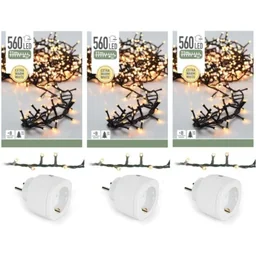
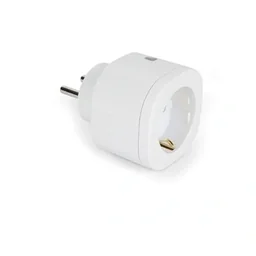
Smart-controlled indoor lighting can complement an alarm strategy.
Additional advice
Ask a second person to test the complete process. They should enter the house, wait for the delay, trigger a zone and check the app notification. Then adjust the rules until every step works without guesswork.
Which alarm strategy is right for your home?
The right strategy depends on your floor plan, household members, pets and periods when the property is unoccupied. An apartment with one entrance needs different zones than a detached house with a basement, garage and outbuilding. Start with the realistic risks and add features as needed.
| Living situation | Recommended basic equipment | Additional features |
|---|---|---|
| Apartment | Door contact, motion detector in the hallway, control panel and app | Glass-break detection, silent notifications, smoke alarm |
| Detached house | Contacts on exterior doors and ground-floor windows, motion detectors along routes through the house | Outdoor siren, separate night zone, backup power supply |
| House with pets | Contacts on the building envelope, pet-friendly detectors according to the manufacturer's instructions | Individual zones, silent alerts, test mode before activation |
| House with garage or outbuilding | Separate zone for the garage, basement or garden shed | Additional repeaters, weatherproof sensors, separate schedules |
How do you use smart home technology in everyday life?
- When away: Activate exterior contacts, motion detectors and the siren. The app informs you about alarms and low-battery warnings.
- At night: Secure doors, windows and ground-floor areas while keeping motion detectors in the bedrooms deactivated.
- When at home: Keep the building envelope monitored and receive silent push notifications when access points are opened.
- On holiday: Designate a trusted contact who can check on the house if the alarm is triggered. Share only the permissions they need.
- When guests visit: Temporarily deactivate individual zones and reactivate them afterwards. An automatic reminder helps ensure you do not forget to return to the normal settings.
Automations can make a house appear occupied. Timed lighting, shutters and individual devices then respond to a predefined schedule. Use these routines sparingly and avoid publicly visible patterns that reveal your absence.
What does regular maintenance involve?
- Check battery levels, wireless connections and the status of the control panel every month.
- Trigger each sensor according to a set testing schedule. Record the date and result.
- Carefully remove dust from motion detectors and check whether furniture or plants have changed the detection area.
- Update user permissions and remove accounts that are no longer needed.
- After changing your router, a power cut or renovation, test all notifications again.
For more solutions relating to protection, equipment and practical safety, you will find suitable categories in Occupational Safety & Security. Discover accessories for your home, property and outdoor areas in the Shop.
Conclusion: A smart home alarm system is reliable when it is tailored to the actual access points and routes through your home. Plan the zones carefully, secure your accounts and network, test every part of the alarm chain and maintain the technology regularly. This turns connected technology into a robust security concept.
Frequently Asked Questions
- Does a smart home alarm system reliably protect against burglary?
- Yes. A smart home alarm system immediately reports opened doors, windows or detected movement to a siren and, depending on the system, to your smartphone. It does not automatically prevent a break-in. Mechanical security, good lighting and properly locked access points remain the first line of protection.
- Where should sensors and motion detectors be installed?
- Place contacts on all easily accessible doors and windows. Motion detectors belong in rooms used as passageways, not directly opposite large radiators or windows. Consider pets, sight lines and wireless range. The control panel should be protected but remain accessible for maintenance and power.
- How can an alarm system be installed correctly?
- Install the control panel according to the manufacturer's instructions, mount contacts flush and test each zone individually. Then define a complete sequence covering arming and disarming, the siren, app notifications and emergency calls. Document the settings and inform everyone in the household.
- How can you protect a smart home against hacking?
- Use a long, unique password for the control panel and user account. Enable two-factor authentication, install firmware updates and, where possible, place IoT devices on a separate Wi-Fi network. Also check which cloud data the provider stores and how long it retains it.
- How often should an alarm system be serviced and tested?
- Check battery levels, the app connection and activation logs every month. Test sensors and the siren after any changes to doors, furniture or Wi-Fi. Replace batteries early and update the contact list. A complete annual function test can uncover developing faults.
You may also be interested in
- Alarm System Test & Comparison 2026
- Smart Home Security: How to Protect Your Home the Smart Way
- Understanding Smart Home Technology: The Guide to a Connected Home
- Home Monitoring with IP Cameras: Keep an Eye on Your Home
- Outdoor Lighting for Burglary Protection: Tips for Your Home
- Smart Home Systems: Benefits for Your Home and Garden