
In brief: A smart home connects lighting, heating, shading, security and garden watering through a single control system. You save time and energy, detect smoke, water or open windows earlier, and adjust routines automatically. For installation, plan your network, power supply and data privacy; a qualified electrician should install mains-voltage devices.
A smart home connects lighting, heating, shading, security and garden watering through a single control system. You save time and energy, detect smoke, water or open windows earlier, and adjust routines automatically. For installation, plan your network, power supply and data privacy; a qualified electrician should install mains-voltage devices.
Smart living does not start with an app. It starts with a clear task: switching lights on automatically, saving heating energy, reporting water leaks or controlling garden watering based on soil moisture. If you define these goals first, you will buy devices that work well together.
A house offers good conditions for this. You can plan the network, switches, blinds and utility room at an early stage. In an existing home, combine wireless devices with individual wired components and expand the system one room at a time.
The best home automation system remains easy to understand. Every automation needs a clear rule, a manual control option and a safe state in the event of a power or network failure.
Why is a smart home worthwhile?
A smart home reduces repetitive tasks. Lights, heating, shading and appliances respond to time, movement, temperature or the status of a window. You do not have to operate each device individually; instead, you define routines for typical situations.
The convenience is especially noticeable in the morning and evening. A schedule opens the blinds on weekdays, a scene switches on dimmed hallway lighting and a window contact prevents the heating from continuing to run when a window is open. These rules work particularly well when you combine only a few conditions.
Energy consumption can also be managed more effectively. Smart radiator thermostats lower the temperature in unused rooms, outdoor sensors take the weather into account and smart plugs disconnect selected appliances from the mains. However, the system does not save energy automatically. You must set operating times, target temperatures and exceptions to suit your everyday routine.
Which routines offer the greatest benefit in everyday life?
- Arriving home: A motion sensor or your smartphone's location activates the hallway light and a comfortable room temperature. The automation remains limited to one area so that it does not accidentally switch on the entire house.
- Away: Window contacts, smoke alarms and water sensors send an alert, while the heating and selected smart plugs switch to an energy-saving state. Cameras can monitor the entrance area if you set privacy and access permissions correctly.
- Sleeping: A scene switches off the lights, lowers the temperature and activates outdoor lighting with motion sensors. A manual button beside the bed must still work.
- Garden care: Soil moisture, rain and time of day determine when the garden is watered. A valve closes if an error occurs, and a maximum run time prevents a faulty sensor from allowing water to flow continuously.
Pro tip
Start with one clear use case, such as lighting in the entrance area or heating control. Name each device according to its room and function. A clear structure saves time later when troubleshooting, expanding the system or handing it over to other family members.
Which devices are part of home automation?
The choice of devices depends on your home, the existing wiring and the level of automation you want. A hub, sensors, actuators and a user interface form the core. Actuators carry out commands, sensors provide data and the hub connects the two.
Which hub and wireless standard are right for you?
A hub or gateway connects devices in different rooms. It stores rules, processes readings and enables control via app, button or voice control. Choose a system that can run important routines locally. This keeps the basic functions working if the internet connection fails.
WLAN is suitable for devices that transmit large amounts of data, such as cameras. Zigbee, Z-Wave and Thread generally use less energy and are suitable for sensors, buttons and thermostats. Matter makes it easier for compatible devices from different manufacturers to work together, but you should still consider range, updates and local functions.
When building a new home or carrying out extensive renovations, it is worth planning for wired connections. Network cables, central distribution points and pre-installed wiring for blinds or occupancy sensors provide a reliable foundation. Wireless devices can supplement hard-to-reach areas and rooms where installing cables afterwards would be disproportionate.
How do you automate lighting, appliances and blinds?
Lighting is one of the easiest ways to get started. Smart bulbs, flush-mounted actuators, buttons and motion sensors switch or dim lights according to time, brightness and occupancy. In rented or existing properties, smart plugs can often be installed without modifying the electrical system. A qualified electrician should install permanently connected switches and dimmers.
For seasonal lighting scenes, the smart phone-controlled Christmas tree lights
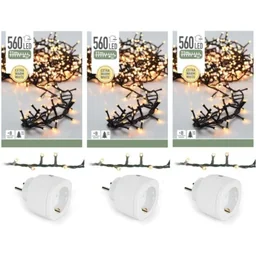
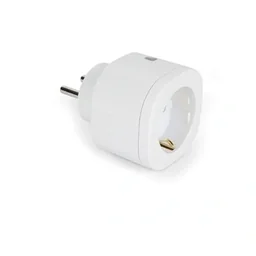
Not every electrical appliance is connected to the internet. However, a smart plug can activate a suitable appliance according to a schedule. The electronic UV insect killer
can, for example, be operated on a timer in a dry indoor area, provided the socket, power rating and manufacturer’s specifications are compatible. Appliances that generate heat, contain a motor or use a lot of power should not be connected unsupervised to just any socket.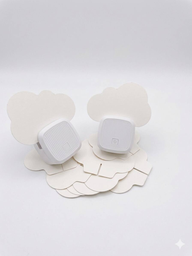
Which sensors control your home and garden?
Sensors turn a remote control into a system that responds to its surroundings. Plan your selection around specific triggers:
- Window and door contacts: They report open access points and can influence the heating or an away scene.
- Motion and occupancy sensors: They switch lights on and detect activity. Occupancy sensors are generally more accurate when people are sitting or working for longer periods.
- Temperature and humidity sensors: They support heating control, ventilation and monitoring in basements, bathrooms or utility rooms.
- Water leak and smoke detectors: They report leaks, the risk of frost or smoke at an early stage. Connected devices supplement the necessary safety equipment, but do not replace suitable, correctly installed detectors.
- Soil moisture, rain and flow sensors: They provide the basis for demand-based garden irrigation and detect unusual water consumption.
For outdoor planning, you will find suitable components in the Garden & Outdoor category. For irrigation, combine soil moisture monitoring with valves, pipes and a maximum run time. The Garden irrigation category offers a suitable selection of products for this purpose.
An automatic system should operate in zones. Lawns, raised beds and planters need different run times. With components for automatic irrigation, you can adjust the rules according to the weather, soil and time of day instead of watering every area on the same schedule.
“Security updates are just as important for smart home devices as they are for computers and smartphones.”
What security technology belongs in a smart home?
Smart home security technology is designed to detect and report events and trigger actions. It cannot prevent every danger and does not replace mechanical security measures. Its advantage lies in providing rapid information and linking multiple signals together.
Which sensors and actuators are useful?
Window contacts show whether an access point is open. Motion sensors detect activity along paths, in hallways or on the patio. Water sensors beneath washing machines, dishwashers and heating systems report leaks before the damage spreads.
Connected smoke alarms can trigger an alarm throughout the house. Temperature or frost sensors can also detect critical readings in basements, garages and utility rooms. A smart siren and push notifications will keep you informed even when you are away from the property.
Cameras and video doorbells require particular care. Point them only at areas you own, limit recordings and assign individual access rights. Store recordings for as short a time as possible and check which functions actually run in the cloud.
How can you protect devices and personal data?
- Use unique passwords: Replace default passwords immediately. Use different, long passwords for your hub, manufacturer account and Wi-Fi.
- Updates: Install firmware and app updates promptly. Only buy devices when the manufacturer clearly states how long updates will be provided.
- Multi-factor authentication: Enable this feature for manufacturer accounts and remote access. It reduces the risk if a password becomes known.
- Separate network: If possible, operate IoT devices on their own Wi-Fi network or VLAN. A compromised device then cannot automatically access private computers and important files.
- Local rules: Run lighting, heating and basic alarm functions locally if the platform supports this. Check which data is processed by the cloud.
- Manual control: Provide switches, keys, spare batteries and emergency procedures. A smart lock must not lock you out if the battery is empty or a fault occurs.
Important note
Work on 230-Volt wiring, distribution boards, permanently connected lights, roller shutter motors and heating controls must be carried out by a qualified electrician. Do not rely on the app alone to switch off circuits; have the installation professionally inspected. Also test regularly whether sensors, batteries and notifications are actually working.
How do you plan the installation in your home?
A good installation starts with a plan of the house. Mark rooms, windows, doors, radiators, roller shutters, the router, consumer unit and possible mounting locations for sensors. In the garden, add the water connection, zones, valves, power supply and wireless range.
First decide which functions are permanently important. Lighting and heating need reliable controls, even if an app is changed. Convenience features such as voice control or automatic scenes can be added later.
What should you clarify before buying?
- Goal: Write down no more than two or three specific automations for each room. Examples include hallway lighting triggered by motion, heating when a window is open or an alert when water is detected.
- Infrastructure: Check Wi-Fi coverage, network cabling, sockets and available space in the utility room. Metal, concrete and long distances weaken wireless signals.
- Compatibility: Compare the wireless standard, hub, app, voice assistants, local control and update support. An inexpensive sensor without long-term support will create extra work later.
- Power supply: Battery-powered devices need accessible mounting locations and a maintenance schedule. For garden sensors, also check moisture, frost and the range to the house.
- Control: Decide which functions should be accessible by switch, app and automation. Guests and children need simple controls without access to private settings.
What are the installation steps?
- Set up the hub: Connect the gateway or server to a stable network and create a dedicated administrator account. Position the hub as centrally as possible and not directly next to large metal surfaces.
- Update the system: First install firmware, app updates and security patches. Change default passwords before adding any other devices.
- Pair devices individually: Add sensors and actuators room by room. After each device, check its range, battery level and correct assignment.
- Assign names: Use clear names such as “Kitchen Window West” or “Garden Zone Raised Bed”. Avoid duplicate names and confusing abbreviations.
- Create rules: Start with one condition and one action. Only then add time windows, presence, brightness or security exceptions.
- Test failure scenarios: Temporarily disconnect the internet, router and individual sensors. Check whether the heating, lighting, doors and irrigation systems enter a safe state.
- Document everything: Record devices, serial numbers, mounting locations, accounts, battery types and responsibilities. Do not keep the documentation exclusively in the cloud.
For outdoor installations, water and electricity must be planned separately. Cables, valves and control units need a suitable ingress protection rating. For the required irrigation equipment, check the pipe diameter, pressure, flow rate and number of irrigation zones. Electrical connections outdoors must be installed professionally by a qualified contractor.
“Data privacy and data security should already be considered when deciding to buy a connected device.”
How much does a smart home cost and how can you expand it?
Costs depend more on wiring and the desired scope than on the number of individual sensors. A small wireless starter kit with a hub, smart plugs and sensors can be relatively affordable. A comprehensive solution for heating, shading, access control, cameras and garden irrigation requires more planning, installation and maintenance.
What budget should you plan for?
- Entry-level: A hub, a few sensors, smart plugs and lights form a small system. This is a good way to test smart-home controls and routines in everyday life.
- Mid-range setup: Additional thermostats, window contacts, roller-shutter actuators, smoke and water detectors, plus a structured network infrastructure, increase comfort and security.
- Comprehensive solution: Cameras, door communication, access control, multiple heating circuits and zoned irrigation require a coordinated concept. Factor in installation, configuration and future maintenance.
- New build or renovation: Wired systems, central distribution boards and pre-installed cabling cost more initially. They make future expansion easier and eliminate battery changes for permanently powered components.
Do not compare the purchase price alone. Check ongoing cloud fees, spare-parts availability, batteries, the duration of software updates and whether you can later transfer devices to another system. An open standard and essential local functions help protect your investment.
How can you keep the system maintainable?
Check batteries, connectivity and error messages every month. Test the most important scenes and detectors every quarter. Remove old user accounts immediately when people should no longer have access to the system.
Do not overcomplicate your automation. Three reliable rules are better than twenty exceptions whose effects no one understands anymore. Every important function needs a manual switch or a clear emergency procedure.
Additional advice
Keep a simple system log. Record devices, firmware versions, battery changes, network names, rules and the date of the last function test. This overview speeds up repairs and helps you rebuild the system in a controlled way after replacing a router or device.
For plumbing installations and connecting your home and garden, you will find suitable products under Plumbing & Irrigation. Plan your smart home as an expandable infrastructure: start with secure foundations, then add convenience features. This allows your smart home to grow with your property without every upgrade changing the entire system.
Frequently Asked Questions
- Which smart-home devices should I get first for my home?
- To get started, you only need a central controller, two or three sensors, smart plugs and a clear lighting or heating routine. Add window contacts, shading controls, smoke detectors and water leak detectors later. Choose devices with open standards, essential local functions and available security updates. This keeps the system expandable.
- Can I install a smart home without a professional installer?
- You can install many wireless devices yourself: set up the app, connect the hub, pair the sensor and test the rules. Work on 230-volt wiring, distribution boards, permanently connected switches or roller-shutter motors must be carried out by a qualified electrician. Professional planning is worthwhile for new builds and renovations so that cabling, networking and the safety concept work together and future changes remain straightforward.
- How can I protect my smart home from hackers?
- Protect every account with its own long password and enable multi-factor authentication if available. Install firmware updates, separate IoT devices from your private computer network and disable unnecessary cloud functions. Point cameras only at areas you own and set clear access permissions.
- Can I automate my garden irrigation?
- Yes. A soil-moisture sensor, rain sensor, schedule and valve actuator can control irrigation as needed. Divide the garden into zones and limit run times. The system must shut off safely in the event of frost, an empty tank or insufficient water pressure. Check pipes and valves regularly.
- Does a smart home still work if the internet goes down?
- Many basic functions continue to work locally when the internet or cloud service goes down, provided the hub and devices support this. Remote access, push notifications and voice services may pause. Check the offline mode before buying and test what happens when the router, power supply or individual sensors fail.
You may also be interested in
- Plan your smart-home system intelligently: home automation
- Set up your smart home: your guide to greater comfort & security
- Voice assistants in the smart home: control your home with your voice
- Smart-home devices for your home and garden: a buying guide
- Smart-home systems: benefits for your home and garden
- Installing a smart light switch: instructions & benefits