
In brief: Security cameras help protect your smart home when you position them strategically, configure them correctly, and respect privacy requirements. Choosing between indoor and outdoor models, Wi-Fi cameras for easy installation, and devices with night vision is key. A clear security plan helps you decide which features you need before you shop in the Work Safety & Security section.
Smart Home Security: Use Security Cameras Correctly
Modern security cameras are more than simple recording devices. They’re active partners in protecting your smart home. How you use them determines how much protection they provide. This guide shows you how to use video surveillance effectively and responsibly.
Why does my home need a security camera?
A camera documents events objectively. You can see who is approaching your property or check whether an alarm is genuine. That peace of mind is valuable whether you’re at home or away. Cameras can also deter potential burglars.
In a smart home, cameras connect with other systems. They can turn on the lights when they detect motion or send a notification to your smartphone. That way, you have the context you need to respond.
“The visible presence of a camera at the entrance to a home is one of the most effective preventive measures. It signals vigilance and increases the risk of offenders being discovered.”
How do I choose the right camera?
Start by considering how you plan to use it. Do you need indoor or outdoor surveillance? Do you want to watch live video only, or save recordings too? Define your needs before browsing our shop.
Indoor vs. outdoor: The basic decision
Outdoor cameras such as the
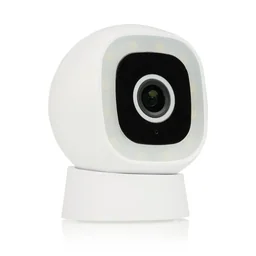
Indoor cameras such as the
are often quieter and less conspicuous. Pan-and-tilt features let you monitor a room remotely through an app. These cameras work well for keeping an eye on pets or checking the entryway from inside.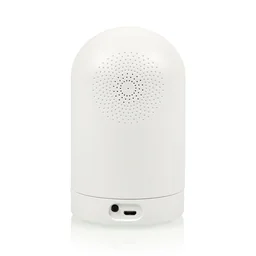
Pro tip
Combine outdoor and indoor cameras for layered security. Place an outdoor camera at the edge of your property and an indoor camera in the hallway. You’ll get early alerts and detailed recordings.
Wi-Fi camera or wired?
Wi-Fi cameras are easy to install. You just need a nearby power outlet, and video data is transmitted wirelessly. Make sure the connection to your router is stable, especially if you’re using the camera outdoors.
Wired models provide a steady, more secure connection. They’re ideal for permanent installations where Wi-Fi fluctuations could cause interruptions. Keep in mind that routing the cable takes more work.
Understanding resolution and image quality
Full HD (1080p) is the current standard. It produces sharp images that can help identify people. Models such as the
offer this resolution for indoor and outdoor use. Higher resolutions such as 2K or 4K require more storage and a very fast internet connection for streaming.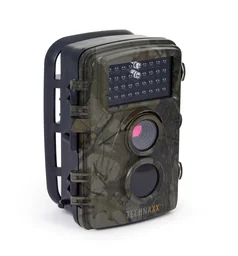
Frame rate affects how smooth your video looks. For surveillance, 15 to 25 frames per second (fps) is usually enough. Higher frame rates are useful when recording fast movement.
Where should I position my cameras for the best results?
Camera placement determines how useful your footage will be. The wrong angle can create blind spots, while a camera in an obvious location may be easy to avoid. Plan your camera positions carefully.
Strategic points for outdoor surveillance
Monitor all entry points, including the front door, patio door, garage door, and basement windows. Mount cameras 2.5 to 3 meters high. This makes them harder to tamper with and gives them a wide field of view.
Angle the camera slightly downward. This helps capture faces clearly and prevents bright skies or streetlights from washing out the image. Test the viewing angle during the day and at night.
Important note
Record only your own property. Recording public sidewalks or your neighbors’ properties without permission can violate their privacy rights and may have legal consequences. Check your local privacy regulations.
Effective positions indoors
Place indoor cameras near the entrance. This lets you document who enters or leaves the house. Another useful location is the hallway leading to bedrooms or living areas.
Avoid private rooms such as bedrooms and bathrooms. Surveillance should be limited to what’s necessary. Often, a view of the living room door from outside is enough.
“The best camera is useless if it has the wrong field of view. Take time to test it before installation. Use a camera app on your smartphone to simulate different perspectives.”
How do I set up my camera securely?
Once you’ve bought your camera, the next step is setting it up. Secure settings protect your privacy and prevent unauthorized access, so take this step seriously.
Secure your network and passwords
Connect the camera to your Wi-Fi network. Use a secure, encrypted network (WPA2/WPA3). Change the default password for the camera’s administrator account right away. Choose a strong, unique password.
In the app, enable two-factor authentication (2FA) if available. You’ll then need an additional code each time you log in, typically sent by text message or generated by an app.
Additional advice
Set up a separate guest network for your smart home devices. This keeps your security cameras and other IoT devices separate from your main network, where your computers and personal data are stored. This limits the damage if a security breach occurs.
Configure notifications and recordings
Adjust the motion detection settings. If they’re too sensitive, you’ll get alerts whenever a bird flies by. Set detection zones so the camera only alerts you to movement in a specific area, such as the path to your front door.
Decide where to store recordings. Local storage on a microSD card works without an internet connection. Cloud storage lets you access recordings from anywhere but often comes with ongoing costs. Compare the available options.
How do I integrate cameras into my smart home?
Standalone cameras are useful. Connected cameras are even more useful. In a smart home system, your devices work together.
Create smart security automations
Connect the camera to smart lights from the Garden + Outdoor section. When the camera detects movement at the edge of your property, the outdoor lights turn on. This can deter unwanted visitors and provide better lighting for the recording.
Pair the camera with your smart home hub. If an alarm is triggered, it can activate all your indoor sirens and send you a push notification with a live image. This lets you assess the situation in real time.
Voice control and remote access
Many cameras work with assistants such as Amazon Alexa or Google Assistant. Use a voice command to ask, “Show me the front door.” The camera feed appears on your smart display or TV.
Remote access through an app is a key feature. When you’re away from home, you can check whether your package has arrived or whether the front door is closed. Look for an easy-to-use app that performs reliably.
Which accessories improve home security monitoring?
The right accessories make video surveillance more reliable and convenient. Consider power, storage, and mounting options.
Uninterruptible power supply
Wired cameras need a power adapter. For outdoor models, it should be weatherproof. A UPS (uninterruptible power supply) keeps the camera running during a power outage. It’s worth considering for critical security areas.
Solar panels are an environmentally friendly option for outdoor cameras. They charge a battery that also powers the camera at night. They’re ideal for remote locations without a power outlet.
Storage media and housing protection
Buy high-quality microSD cards with enough capacity (at least 64 GB) and a high write speed (Class 10 or UHS). They can record continuously in loop mode for weeks before overwriting the oldest recordings.
A lightning protection module protects expensive electronics during thunderstorms. For extreme weather, you can find suitable protective covers in our range. They protect against heavy rain and direct sunlight.
Conclusion: Security with a system
Effective home security monitoring requires careful planning. Start by identifying your individual security risks. Then choose cameras that meet your needs. The products , and show the range of solutions available.
Install and configure the devices with security and data protection in mind. Integrate them into your smart home to automate tasks. This systematic approach can create a reliable digital guard for your home.
Browse our extensive range in the Occupational Safety & Security section and find the right security camera for your needs.
Frequently asked questions
- Where is the best place to install a security camera?
- Install cameras at key entry points, such as the front door, patio door, and garage entrance, at a height of 2-3 meters. Make sure each camera has a wide field of view with no blind spots, and avoid pointing it at direct light sources, such as the low sun, which can overexpose the image.
- What is the difference between indoor and outdoor cameras?
- Outdoor cameras need a weatherproof housing (IP65 or higher) and more powerful infrared night vision to cover larger areas. Indoor cameras are often more compact, rotatable, and quieter, but aren’t suitable for rain or freezing temperatures. You can find both types in our Occupational Safety & Security category.
- Do I always need internet for a Wi-Fi camera?
- A stable Wi-Fi connection is required for live streaming to your smartphone and for notifications. However, many models store recordings locally on an SD card, which you can review later even without internet access. Check the storage options before you buy.
- What does 1080p resolution mean on a camera?
- 1080p (Full HD) refers to a video resolution of 1920x1080 pixels. It provides sharp images that let you recognize faces or license plates from a reasonable distance. For highly detailed recordings of large areas, 2K or 4K models may also be suitable.
- How do I protect my security camera from hackers?
- Protect your Wi-Fi network with a strong password. Enable two-factor authentication in the camera app if available. Install the manufacturer’s firmware updates regularly, and don’t use the device’s default password.
You might also be interested in
- Home security with IP cameras: Keep an eye on your home
- Smart home security: How to protect your home intelligently
- Security camera review and comparison 2026
- Set up a smart home: Your guide to greater comfort and security
- Preventing break-ins while on vacation: Make your home look occupied
- Get the most from your Fritzbox: Tips for smart homes and networks