
In brief: Voice assistants such as Alexa, Google Assistant and Siri make it easy to control your smart home from one place. Simple voice commands can manage your lighting, heating, entertainment system and even lawn irrigation. Connect them through a smart speaker or compatible devices. For a setup that runs smoothly, pair voice control with reliable timers so your routines work automatically, even when you don't give a command.
Smart Home Voice Assistants: Control Your Home by Voice
Your hands are full while you're gardening or cooking. Instead of reaching for a switch or adjusting the thermostat, you simply say what you need. The lights come on, music starts and the heating adjusts. Voice assistants make smart home control part of everyday life.
These smart assistants do more than play music. They can help you save energy, make daily tasks more convenient and control devices throughout your home and garden with a single command.
What Are Voice Assistants and How Do They Work in a Smart Home?
Voice assistants are AI-powered programs that recognize spoken language and turn it into actions. In a smart home, they act as a central control point, connecting to other smart home devices over Wi-Fi or through protocols such as Zigbee.
It works like this: you give a command, such as "Hey Google, turn on the garden light." The assistant recognizes what you want, sends the command to the compatible device and the device responds. It all happens in real time.
Pro tip
Place your smart speakers in central locations, away from walls and corners. This can help them pick up your voice commands more clearly. A spot near the center of the room, on a table or shelf, works well.
What Can Voice Commands Do for Your Home and Garden?
Voice control for home automation can do much more than turn devices on and off. You can also create routines that control several devices at once.
Control Lighting and Climate by Voice
One of the most useful features is setting and activating lighting scenes. Say "Alexa, turn on the living room evening lights" to dim the lamps to 30%. You can also control thermostats, air conditioners and fans. For example, turn down the heat by voice as you leave to help save energy.
Centralize Entertainment and Multimedia
Control your TV, soundbar and music services with your voice. One command can start a playlist on several speakers throughout the house. You can also play podcasts and audiobooks hands-free.
Connect Appliances and Security Devices
Start a robot vacuum, brew coffee on command or view a live feed from a smart camera on your TV. Ask, "What's the temperature in the kids' room?" and get an answer from a connected sensor.
The real strength of voice control comes from automating everyday routines. A "Good night" routine that adjusts the lights and heating and sets the alarm can make your home more comfortable and secure.
Control Your Garden and Outdoor Spaces
Voice control is especially useful for gardeners. Connect smart controls to automatic irrigation systems. A voice command can start the sprinklers or pause watering when unexpected rain begins.
Use smart plugs to control garden lights, fountains or grills and fire pits. You can also schedule devices such as the
(3D pole pruner attachment) to switch on or off with a smart plug.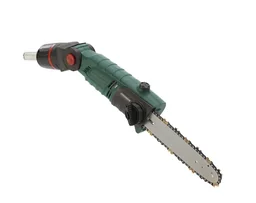
How Do I Add a Voice Assistant to My Existing Home?
You can set up a voice assistant in a few simple steps. You don't need a brand-new home to get started.
Step 1: Choose the Right Voice Assistant
Choose an ecosystem: Amazon Alexa (with Echo devices), Google Assistant (with Nest speakers) or Apple Siri (with HomePod). The key is to make sure it works with the devices you already own or plan to buy.
Step 2: Choose a Smart Speaker or Hub
Start with a central device in a room you use often. An Echo Dot or Nest Audio provides voice control right out of the box. In a larger home, add more devices so you can use voice commands from different rooms.
Important note
Review your privacy settings. Turn off voice recording or voice purchasing if you don't want to use these features. Set up voice profiles so the assistant responds only to recognized users.
Step 3: Add Compatible Smart Home Devices
Start with smart plugs, such as the
. This digital weekly timer with 10 switching options per day is a simple way to get started. Set a schedule or use a voice command to turn conventional devices on and off.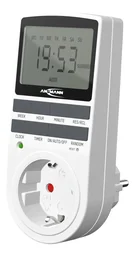
Look for devices labeled "Works with Alexa" or "Google Assistant compatible." You'll find more and more options in power tools and garden equipment.
The most successful smart home setups start with a specific problem, not the technology. Before you shop for devices, ask yourself: Which everyday task would I like to automate? Your answer will point you to the right solution.
Step 4: Set Up Routines and Automations
This is where a smart home really comes together. Routines link actions to a trigger. For example, saying "Alexa, I'm home" can turn on the hallway lights, close the smart garage door and start your "Relax" playlist.
Additional tip
Set up routines that run on a schedule, too. Have the blinds open and the coffee maker start at 7 am. Pair your voice assistant with reliable timers to keep things running automatically.
Practical uses: voice control for your garden and outdoor spaces
Smart assistants really shine in the garden. They can control your systems while you take care of other tasks.
Control your irrigation system with ease
Smart irrigation controllers can be started, stopped, or adjusted with voice commands. Ask, "How long was Zone 1 active today?" to keep track of your water use. Find the right components in our irrigation technology category.
Lighting for patios and pathways
Create the right mood and improve security. Saying, "Hey Google, set the garden lights to 100%," is handy when you're working outside in the evening. Say, "Alexa, create a romantic atmosphere on the patio," to dim the lights and play soft music.
Control appliances and tools
Smart plugs can make ordinary appliances smarter. Use voice commands to switch an electric lawn mower, leaf blower, or saw on and off while you use it. This saves electricity and improves safety. For motorized devices such as the , this is a practical addition to manual controls.
Which smart gadgets work best with voice assistants?
Not every gadget needs built-in voice control. Often, a smart plug is all you need to connect it to your smart home.
Smart plugs and adapters
The is a great example. It's primarily a digital timer, but once it's integrated into your smart home, it can also switch any connected device on or off by voice command. This makes it easy to automate fountains, pond pumps, or fans.
Smart sensors for useful data
Add temperature, humidity, or rain sensors. Your voice assistant can then tell you the latest readings from your garden or greenhouse when you ask. This information is useful when planning irrigation.
Wearables with voice assistant features
Devices such as the
(sunglasses with Bluetooth headphones and voice assistant features) give you more ways to control your smart home. They're ideal for the garden: listen to music and control other devices by voice at the same time, without reaching for your smartphone.
Challenges and what to keep in mind
This technology can do a lot, but it has a few limitations. A reliable Wi-Fi connection is essential. Devices in far corners of the garden may need a Wi-Fi repeater.
Check that your devices are compatible. Devices that use Zigbee or Z-Wave often need a dedicated hub to communicate with your voice assistant. Read product descriptions carefully.
Start small. Begin with one room or one function. Setting up too much at once can get frustrating. A product such as the is an affordable, easy way to get started.
Conclusion: your home becomes an intelligent partner
Voice assistants make smart home control accessible to everyone. They make everyday tasks simple and intuitive. Whether you start the irrigation from your lounge chair or dim the lights for a backyard barbecue, your voice becomes a versatile control tool.
The key is to add devices gradually. Combine reliable basics such as timers with the convenience of voice control. The result is a dependable, comfortable, energy-efficient home that responds to your needs.
Find products to get started in our shop, especially in the Garden + Outdoor and Power Tools categories.
Frequently Asked Questions
- Which voice assistants are best for home automation?
- Amazon Alexa and Google Assistant work with a wide range of smart home devices from different manufacturers. Apple's Siri (via HomePod) is a good fit if you use a lot of Apple products. The best choice depends on the devices you already own and the services you prefer.
- Can I control my garden irrigation with voice commands?
- Yes. Smart irrigation controllers, including products from Gardena Smart, can work with voice assistants. Husqvarna Automower Connect products can also be integrated with voice assistants. You can then say, "Alexa, start the garden irrigation," or "Hey Google, pause the lawn irrigation for 30 minutes."
- Do I need a separate app for each device when I use a voice assistant?
- Initially, yes, for setup and basic configuration. After that, you can connect your devices in your voice assistant's app (Amazon Alexa app or Google Home app) and create routines. This lets you manage your devices from one place and control them by voice.
- Are smart home voice commands secure from unauthorized access?
- Modern systems use encryption. The biggest risks are weak passwords for your Wi-Fi or assistant account, and physical access to your smart speaker's microphone. Enable wake-word voice activation ("Alexa") and use voice recognition if it's available.
- Can I use my smart devices without a constant internet connection?
- Only to a limited extent. Voice commands to cloud-based assistants such as Alexa require an internet connection. Many smart devices, such as Zigbee or Z-Wave hubs and local control systems (e.g. Home Assistant), can also work offline. Check whether local control is available before you buy.
You may also be interested in
- Smart home voice control: using Alexa for your home and garden
- Understanding smart homes: the guide to a connected home
- Smart home systems: benefits for your home and garden
- Smart home heating and lighting: efficient and comfortable
- Setting up a smart home: your guide to greater comfort and security
- Robot vacuum cleaners for smart homes: efficient everyday cleaning